CT Applications Training: Building Confidence With New Scanner Technology
An experienced CT technologist already understands patient care, positioning, scan preparation, and the clinical demands of a busy imaging department.
What changes when the scanner changes is the technology used to perform that work.
A new interface, different protocol structure, unfamiliar reconstruction tools, or a change in manufacturer can create a learning curve even for an experienced team.
CT applications training gives technologists hands-on, system-specific support so they can understand how the scanner fits into their department's clinical workflow.
Hospitals may need this support when installing a scanner, replacing older equipment, changing OEM platforms, introducing advanced applications, opening a temporary imaging location, or onboarding additional staff.
Atlas Medical provides
imaging applications training and temporary technologist staffing for hospitals and imaging providers with project-based clinical support needs.
CT Experience and Scanner
Experience Are Not the Same Thing
A technologist can have extensive CT experience without having worked on every scanner platform.
Systems from Siemens, GE HealthCare, Philips, Canon, and other manufacturers may approach functions differently, including:
- Exam setup
- Protocol selection
- Scan planning
- Reconstruction
- Dose-management tools
- Bolus timing
- Post-processing
- Image review
- Console navigation
Applications training helps connect the technologist's existing clinical knowledge with the specific system they are expected to operate.
It isn't equipment-repair training or a general CT course.
Instead, it focuses on the clinical use of the installed scanner and its available applications.
When Does a CT Department Need Applications Training?
Applications training can support several different types of CT projects.
A New CT Scanner Is Being Installed
The clinical team needs to understand the scanner before normal patient volume moves onto the new system.
Training can be coordinated around installation and go-live so staff have an opportunity to work with the system before settling into daily operations.
The Hospital Is Changing Manufacturers
Moving from one OEM platform to another can create additional training needs.
The clinical objective may remain the same while menus, terminology, controls, protocol architecture, and reconstruction processes change.
System-specific training can concentrate on those differences.
New Applications Have Been Added
A department adding advanced software or clinical packages may not need a complete introduction to the scanner.
Instead, it may need targeted training around the newly available capabilities.
A Temporary Scanner Is Being Used
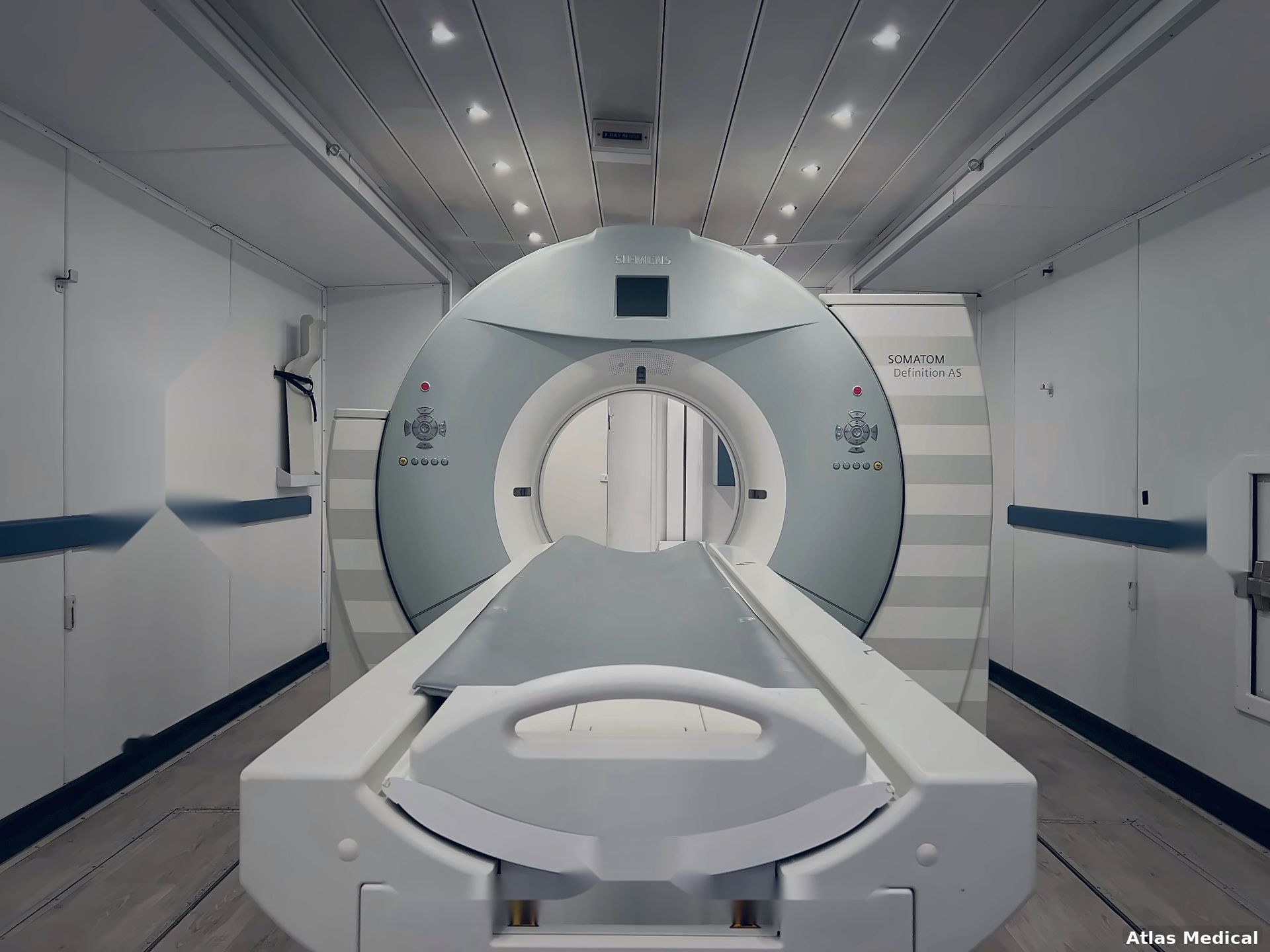
Hospitals using an Atlas Medical mobile CT scanner during renovation, replacement, equipment downtime, or temporary capacity needs may need to transition staff onto an unfamiliar system quickly.
Applications training can become part of the temporary deployment and go-live plan.
Staff Need Refresher or Onboarding Support
Applications support can also help when new technologists join the department or when an existing team needs additional system-specific training.
Build CT Training Around the Exams the
Hospital Actually Performs
A generic training agenda is unlikely to serve every imaging department equally.
A community hospital, trauma center, outpatient imaging facility, oncology program, and cardiac CT program may all use CT differently.
Before training begins, the applications specialist should understand the hospital's:
Scanner + staff experience + exam mix + installed applications + workflow priorities
This allows training time to be directed toward the areas that matter most.
For example, a department performing a high volume of routine CT may have different priorities from a team preparing to use an advanced clinical package.
The training program should reflect that difference.
Start at
the Console
One of the first goals should be making the scanner's daily workflow familiar.
Training may cover:
- System navigation
- Startup and shutdown
- Patient registration
- Worklist use
- Exam setup
- Scan planning
- Image review
- Common console functions
- Daily operational workflow
For teams changing scanner platforms, the applications specialist can identify where familiar functions are located and how workflows differ from the previous system.
This allows experienced technologists to concentrate on learning the new technology rather than relearning CT fundamentals.
Practice Patient Positioning and
Scan Planning on the Actual System
After defining the clinical requirements and approximate project dates, the hospital can begin evaluating available rental options.
Availability matters because hospitals aren't simply renting an empty trailer. They may require a specific technology platform or configuration.
Provide prospective rental partners with as much useful information as possible, including:
- Expected start date
- Estimated rental duration
- Preferred technology
- Clinical requirements
- Hospital location
- Proposed mobile unit location
- Known site restrictions
This gives the provider a clearer picture of the project and which available solution may be appropriate.
Translate Existing Protocols
to the New Platform
Hospitals often have established protocols before new equipment arrives.
Those protocols shouldn't necessarily be copied setting-for-setting onto another scanner.
Applications training can help the clinical team understand how its existing workflow translates to the new system.
Depending on the hospital's services and installed applications, training might address workflows involving:
- Routine head CT
- Chest imaging
- Abdomen and pelvis
- Spine exams
- CT angiography
- Trauma imaging
- Oncology imaging
- Low-dose techniques
- Cardiac applications
- Perfusion applications
- Interventional workflows
Final protocol decisions remain the responsibility of the hospital's appropriate clinical leadership and radiologists.
The applications specialist's role is to help the team understand how the scanner's available tools can support those decisions.
Include Contrast Workflow
in the Training Plan
Contrast-enhanced CT involves coordination between the scanner, technologist, patient, and potentially an injector system.
Depending on the engagement, applications support may address scanner-side workflows such as:
- Contrast-enhanced exam setup
- Bolus tracking
- Test-bolus workflow
- Scan timing
- Acquisition initiation
- Image review
Hospitals should identify the injector and related equipment before the engagement and clarify whether injector-specific training is included in the training scope.
This is another reason the equipment inventory should be established before the specialist arrives.
Don't Stop
at Image Acquisition
Modern CT workflow can continue well beyond acquiring the original series.
Depending on the scanner and installed applications, technologists may work with:
- Reconstruction options
- Reconstruction kernels
- Slice thickness
- Iterative reconstruction tools
- Multiplanar reformats
- Maximum-intensity projections
- Volume-rendering tools
- Advanced clinical packages
Applications training can help users understand where these functions are located and how they fit into the department's established workflow.
The exact scope should be based on the technology installed at the facility.
Include the Scanner's
Dose-Management Features
Applications training should also familiarize technologists with the dose-related tools available on the scanner.
Depending on the platform, this may involve reviewing system-specific:
- Automatic exposure features
- Protocol settings
- Dose displays
- Optimization tools
- Related scanner functions
Applications training supports the hospital's broader radiation-safety and quality processes.
It does not replace manufacturer instructions, hospital policy, regulatory requirements, physicist review, or other required clinical oversight.
Use Training to Address
Workflow Friction
Not every training request begins with a new scanner.
Sometimes the department is already using the system but has identified areas where workflow is inconsistent or users need additional support.
An applications specialist can help staff better understand how scanner settings and workflow steps relate to common operational issues.
Depending on the project scope, training may address factors involving:
- Patient motion
- Positioning
- Field of view
- Metal-related challenges
- Scan timing
- Reconstruction
- Workflow consistency
The applications specialist isn't performing equipment service or interpreting patient images.
The focus remains on helping users understand and operate the system appropriately within their clinical responsibilities.
Why OEM and Scanner-Model
Experience Matter
For CT applications training, modality experience alone isn't always enough.
The strongest resource match considers the actual scanner.
Before requesting support, hospitals should identify:
| System Detail | Why It Helps Define Training |
|---|---|
| OEM | Identifies the manufacturer's platform |
| Scanner model | Narrows the required system experience |
| Software version | Identifies the interface and available functionality |
| Detector/slice configuration | Helps define the specific scanner environment |
| Installed applications | Determines which advanced tools may need support |
| Post-processing environment | Clarifies workflow outside the scanner console |
| Injector | Helps define contrast-workflow requirements |
| PACS/worklist environment | Identifies integration considerations |
Atlas Medical works to match project requirements with applications specialists who have relevant OEM and system experience across major manufacturers. The exact resource depends on the equipment, location, schedule, and requested support. Learn more about
Atlas Medical’s Imaging Applications Training
services.
How Much CT Applications Training
Does a Department Need?
There isn't one correct number of training days.
A focused refresher for an experienced team may require less time than a department moving onto a completely unfamiliar platform.
Training duration can be influenced by:
Staffing
How many technologists need training? Are they spread across multiple shifts?
Experience
Has the team previously worked on this OEM or scanner family?
Technology Change
How different is the new system from the scanner being replaced?
Clinical Scope
Does the team primarily need routine workflow support, or are advanced applications involved?
Go-Live Requirements
Does the hospital want training before go-live, support during early operation, or both?
Scheduling
Does training need to accommodate day, evening, weekend, or staggered shifts?
The goal is to give staff enough time to use the scanner, ask questions, and repeat important workflows.
Not simply watch a system demonstration.
What Atlas Needs to
Match the Training Resource
Hospitals can make the resource-matching process more efficient by providing a clear project profile.
Before requesting CT applications support, gather:
- Scanner manufacturer
- Scanner model
- Software version
- Installed advanced applications
- Training location
- Requested dates
- Daily training hours
- Go-live date
- Number of technologists
- Shifts requiring support
- Staff experience level
- Highest-volume exams
- Areas requiring additional attention
- Injector information
- Post-processing environment
- Facility onboarding requirements
The department should also identify a lead CT technologist or manager who can coordinate the engagement and document follow-up items.
CT Applications Training
for a Mobile Scanner
Temporary imaging projects can create a compressed learning period.
A hospital may need to shift patient volume from a permanent scanner into a temporary unit while the permanent room is renovated, replaced, repaired, or otherwise unavailable.
Atlas Medical's mobile CT scanner solutions support hospitals managing renovations, equipment replacement, downtime, and temporary imaging-capacity needs.
In these situations, applications training should address more than the scanner interface.
The temporary environment itself may introduce differences such as:
- Console configuration
- Room layout
- Patient-entry process
- Injector setup
- Workstation location
- Image-transfer workflow
- Different OEM equipment
Hospitals can also review Atlas Medical's mobile CT scanner preparation
guidance when planning the broader temporary deployment.
Training then becomes one workstream within a larger readiness process involving
facilities, IT, radiology, and the temporary imaging provider.
Training Solves a Knowledge Gap.
Staffing Solves a Coverage Gap.
These two needs can occur at the same time, but they should not be confused.
Consider a hospital moving to a new scanner while also dealing with an open CT technologist position.
The permanent team may need application training to understand the equipment.
At the same time, the department may need temporary clinical coverage to maintain its schedule.
Those are different roles.
Applications specialist → system knowledge and workflow support
Temporary CT technologist → clinical staffing coverage
Atlas Medical's Imaging Applications Training & Technologist Staffing offering allows hospitals to submit either type of requirement—or both—for project review.
Each role should still have
its own responsibilities, schedule, and project scope.
A CT Training
Readiness Snapshot
Before the scheduled training date, the department should be able to answer five questions:
1. What exact scanner are we training on?
OEM, model, software, and installed applications should be known.
2. Who needs training?
Identify the technologists and shifts that need support.
3. What does the team need to learn?
Separate routine workflow needs from advanced or project-specific requirements.
4. When does the scanner need to be clinically ready?
Training should align with the actual project and go-live schedule.
5. What happens after the specialist leaves?
Identify who will own follow-up questions, protocol decisions, and additional training requirements.
If those five areas are clear, the applications specialist arrives with a much stronger understanding of what the hospital needs.
Request CT Applications Training
From Atlas Medical
Atlas Medical provides imaging applications training and temporary technologist staffing across multiple imaging specialties, including CT.
Atlas can review the hospital's scanner platform, system configuration, location, dates, staff experience, training objectives, and temporary staffing requirements to help identify an appropriate clinical resource.
Hospitals preparing for a new CT scanner, changing OEM platforms, deploying a temporary scanner, adding advanced applications, or addressing a system-specific training need can
request clinical support or
contact Atlas Medical to discuss the project.
Frequently
Asked Questions
What is CT applications training?
CT applications training is system-specific, hands-on education that helps technologists understand how to use a CT scanner's interface, protocols, acquisition tools, reconstruction options, dose-related features, and clinical workflow.
Does an experienced CT technologist still need applications training on a new scanner?
Potentially. Clinical CT experience and experience with a particular scanner platform are different. Training can help experienced technologists understand how familiar CT workflows are performed on an unfamiliar OEM, model, software version, or temporary system.
Can CT applications training focus only on certain advanced applications?
The scope can be defined around the project's needs and installed technology. Hospitals should provide the scanner model, software version, installed applications, clinical priorities, and requested training areas when requesting support.
Can application training be scheduled around CT go-live?
Go-live support can be part of the requested project scope. The hospital should provide its planned go-live date, requested support dates, staff schedule, and anticipated training needs when discussing the engagement.
Can applications training support a temporary mobile CT scanner?
Yes. Atlas provides applications training as part of its mobile CT offering. Training can help staff become familiar with the scanner and temporary environment before normal patient volume transitions to the mobile unit.
Is protocol approval part of CT applications training?
Applications training can help technologists understand the system's protocol architecture and available tools, but final protocol approval remains with the hospital's appropriate clinical leadership and radiologists.
Can Atlas provide temporary CT staffing in addition to training?
Atlas's clinical-support offering includes both applications training and temporary technologist placements. A hospital can request both needs for the same project while keeping the applications and clinical staffing responsibilities clearly defined.
Mobile CT Scanner Price
Curious what you’ll pay for a mobile ct scanner truck or trailer? Pricing depends on several key factors:
- Scanner Model & Slice Count: Cutting-edge, higher-slice scanners demand higher monthly fees.
- Length of Rental: Longer commitments often reduce monthly costs.
- Service & Maintenance Packages: Opting for a full-service plan can raise costs but remove the burden of repairs.
- Geographic Location: Transport fees and regulatory requirements may bump up the final price.
Our typical Mobile CT rentals range from $20k to $40k per month.
Learn more about what goes into Mobile CT Rental Pricing HERE.
Turnkey Mobile CT Scanner
A “turnkey” mobile CT unit means all in one, no guesswork necessary. From power hookups and specialized staff training to compliance with local regulations, Atlas Medical delivers a seamless experience. Roll in, plug in, and start scanning—it’s that straightforward.
We offer Mobile CT rentals featuring all the major OEMs:
GE
Siemens
Philips
Canon




Why Choose Atlas Medical
Extensive Inventory
Whether you’re after a 16-slice workhorse or a high-slice advanced system, we have the mobile ct scanner trailer or truck to match your needs. We offer mobile CT scanner from major OEMs such as GE, Siemens, Canon, and Philips.
Flexible Agreements
From short-term mobile ct rental options to purchase and long-term leases, we tailor solutions that fit your budget and strategic goals.
Dedicated Support
Our expert team isn’t just about dropping off a trailer. We handle setup, maintenance, and regulatory compliance so you can focus on patient care. To get started we can help you
choose the best mobile CT scanner for YOU and guide you through
site prep requirements.
Proven Reputation
Hundreds of clinics, hospitals, and imaging centers nationwide trust Atlas Medical to expand their diagnostic services. We'll even guide you through
Mobile CT legal regulations and requirements.
Ready to elevate your imaging capabilities?
Let us help you bring advanced diagnostic services directly to your patients—without the cost and wait of permanent construction. When you need to rent, lease, or buy a mobile ct unit, trust Atlas Medical to deliver modern solutions for modern healthcare.

Sean Schneider
Mobile Project Manager · Atlas Medical
About the Author
Say hello to Sean Schneider - our Mobile Project Manager at Atlas Medical. Sean has worked in the medical imaging industry for over 20 years, including 10 years with Atlas Medical.
Sean has a knack for making complicated projects simple to understand. Around here, Sean's the man who keeps things moving smoothly.
When Sean isn't helping launch our mobile imaging units at new sites he enjoys spending time with his family, golf, and hockey.
Request a Mobile Imaging Solution
Our Services Include: