Mobile CT Scanner Installation: From Delivery and Setup to Clinical Go-Live
By the time a mobile CT scanner arrives at a hospital, much of the planning should already be complete.
The site has been selected. Facilities has reviewed the proposed location. Power and connectivity requirements have been discussed. The hospital knows when temporary CT capacity needs to become available.
But delivery is not the same as go-live.
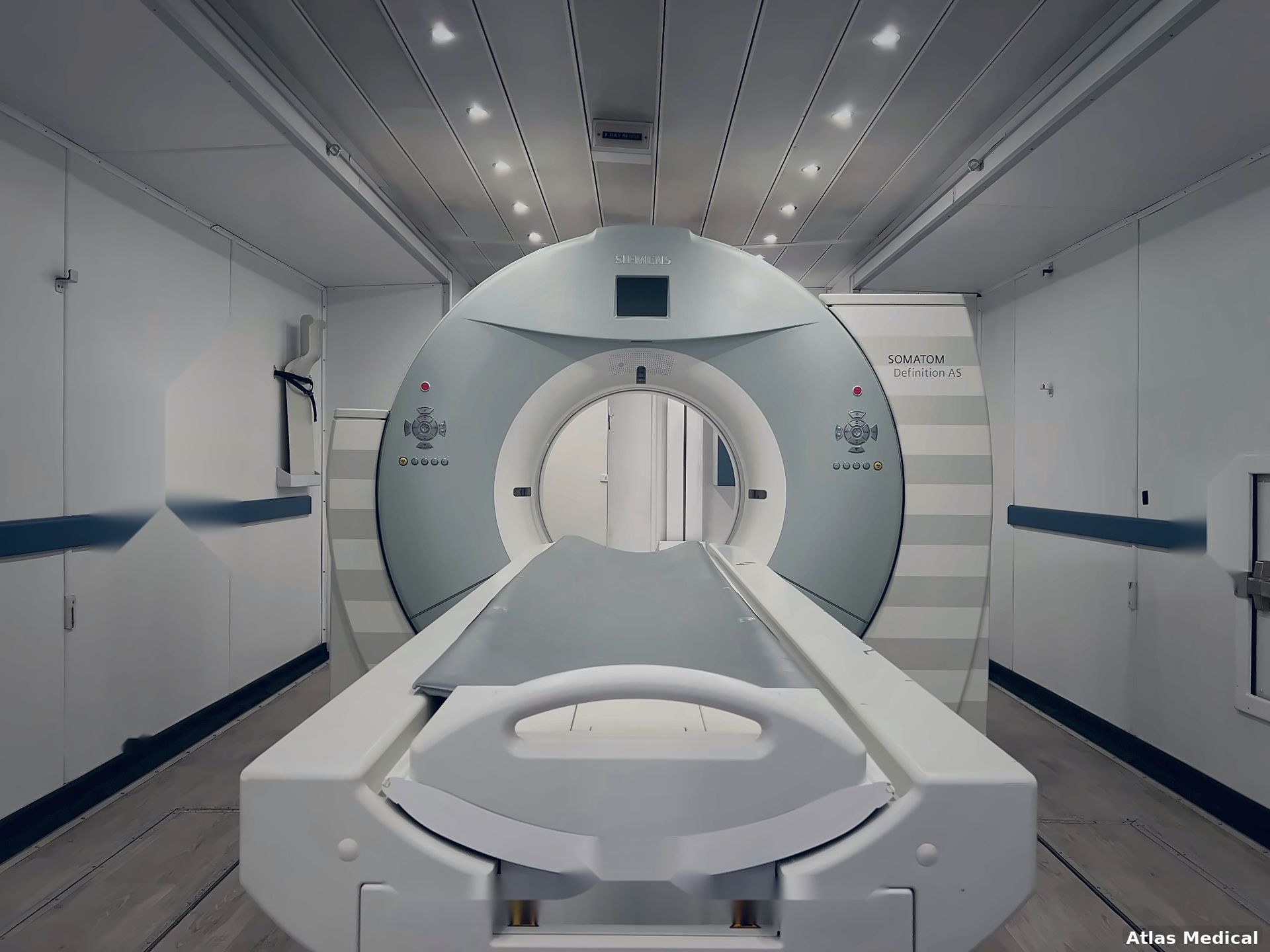
A mobile CT scanner installation still involves positioning the unit, connecting infrastructure, integrating the scanner with hospital systems, verifying equipment readiness, preparing technologists, and completing the hospital's own pre-clinical requirements.
Understanding that sequence helps project teams avoid treating the arrival date as the same thing as the clinical start date.
Hospitals evaluating temporary CT capacity can review Atlas Medical's
mobile CT scanner solutions before building their deployment schedule. Atlas currently offers mobile CT systems from major OEMs and includes applications training and integration support as part of its turnkey approach.
Installation Starts Before
the Trailer Reaches the Hospital
The physical installation is only one stage of a larger deployment.
Before transportation is scheduled, the hospital should already have addressed the requirements that could delay setup after arrival.
That may include:
- Proposed trailer location
- Delivery access
- Electrical readiness
- Network availability
- Required facility work
- Patient-access planning
- Staff workflow
- Internal approvals
- Regulatory coordination
- Applications-training schedule
Atlas Medical's Preparing for Your Mobile CT Scanner guide covers the broader pre-delivery site-planning work, including surface, power, connectivity, and regulatory considerations.
This installation guide picks up where that planning leaves off.
Step 1: The Mobile CT Arrives and Is Positioned
The first visible step is transportation and physical placement.
The delivery team must be able to move the unit through the hospital campus and into the planned position.
This is why the delivery route should already have been reviewed for:
- Turning space
- Gates
- Curbs
- Parked vehicles
- Construction traffic
- Overhead restrictions
- Tight access points
- Final trailer orientation
Atlas states that its mobile CT units can be up to approximately 14.5 feet wide by 50 feet long, so the actual mobile configuration should be considered during both delivery and placement planning.
Once positioned, the unit may need additional setup according to its configuration and the site.
The project team should confirm that the trailer is in the location originally reviewed by facilities and that utility connections remain practical from that final position.
Step 2: Electrical Connections Are Established
Power is one of the most important technical requirements after positioning.
The hospital should already know the electrical requirements for the specific mobile CT unit before delivery.
Atlas has dedicated guidance on mobile CT scanner power requirements, which explains why facilities teams should work from unit-specific electrical specifications rather than generic assumptions.
During installation, the focus shifts from planning to connection and verification.
Facilities teams may need to confirm:
- Electrical connection is ready
- Connection point is accessible
- Required infrastructure has been completed
- Power is available for the full mobile environment
- Site conditions match what was planned
The exact electrical work and verification process depend on the unit and hospital.
The important distinction is that installation should not be the first time anyone checks whether the proposed power source is appropriate.
Step 3: Other Required Utilities Are Connected
Depending on the mobile CT configuration, additional utilities or infrastructure may also need to be connected.
The hospital should use the specifications provided for the actual unit and clarify responsibilities before the installation date.
Relevant items may include:
- Network connections
- Other facility connections
- Environmental support
- Drainage or water if applicable to the specific configuration
- Physical connections between the temporary unit and hospital workflow
Not every mobile CT project will require the same infrastructure.
That is why the provider's project-specific site requirements should remain the primary reference during installation.
Step 4: The Scanner and Mobile Environment Are Prepared
Once the unit is positioned and connected, attention shifts to the imaging environment itself.
Atlas describes its mobile CT offering as turnkey and states that its team handles setup and support rather than simply delivering a trailer.
Depending on the project, setup activities may involve:
- Preparing the CT system for operation
- Confirming equipment status
- Checking installed components
- Reviewing the scanner configuration
- Confirming supporting systems
- Preparing the console and clinical workspace
- Verifying the temporary room is ready for the hospital's next technical steps
The exact sequence depends on the scanner and unit configuration.
Hospitals should avoid assuming that power-on means the scanner is immediately ready for patient use.
Step 5: Hospital IT and Atlas Connect the Scanner to the Clinical Network
A temporary CT scanner still needs to function within the hospital's imaging workflow.
Atlas states that its mobile CT solutions can connect to existing PACS/EHR environments and that its IT team coordinates with hospital IT teams around network configuration, DICOM routing, and related connectivity.
Installation may therefore include coordination around:
- Network access
- DICOM configuration
- PACS connectivity
- Worklists
- RIS/EHR connectivity
- Image-routing destinations
- User access
- Hospital security requirements
- Connectivity testing
This step is critical because a scanner that produces images but cannot properly communicate with the hospital's imaging systems is not fully integrated into clinical workflow.
IT should therefore be involved before the installation date and available during the appropriate integration window.
Step 6: Confirm Image Transfer and Workflow
Connectivity should be tested, not assumed.
The hospital's IT and imaging teams should verify that the temporary scanner can participate in the expected workflow.
Depending on hospital processes, testing may involve:
Order/worklist → Scanner → Image acquisition → DICOM transfer → PACS → Review
The goal is to confirm that the temporary CT fits into the existing digital imaging environment before normal clinical volume begins.
This is also an opportunity to identify workflow differences from the permanent scanner.
For example:
- Is the worklist accessed differently?
- Are series names different?
- Do images route to the expected destinations?
- Are technologists logging in through a different workflow?
- Are there temporary network limitations?
- These questions become easier to solve before clinical go-live than during a busy CT schedule.
Step 7: Prepare the Physical Patient Workflow
The mobile CT may be technically operational while the hospital still needs to confirm how patients will move through it.
A temporary imaging environment can change:
- Patient entry
- Stretcher route
- Wheelchair route
- Staff entry
- Waiting/preparation areas
- Supply movement
- Communication with radiology
- Access during bad weather
- Movement between the hospital and trailer
This should be tested before the first scheduled patients arrive.
Walking through the route with staff can uncover small operational issues that were not obvious from a site drawing.
Step 8: Applications Training Begins
Once the scanner is ready for hands-on use, technologists need time with the actual system.
Atlas Medical includes applications training with its mobile CT rentals and states that its applications team includes former technologists with prior experience on the systems.
Applications training can help staff understand:
- Scanner interface
- Exam setup
- Protocol selection
- Scan planning
- Positioning workflow
- Reconstruction
- Image review
- Dose-related tools
- Contrast workflow
- Temporary-room differences
Hospitals needing deeper or project-specific support can also review Atlas Medical's CT Applications Training resource, which focuses specifically on system knowledge, protocol workflow, OEM differences, and clinical go-live preparation.
Applications training should occur close enough to go-live that staff can immediately apply what they learn.
Step 9: Test the Temporary Workflow Before Clinical Volume Moves Over
A useful installation process includes more than technical verification.
The hospital should rehearse how the temporary CT environment will operate.
That may include reviewing:
- Patient arrival
- Registration
- Worklist
- Patient positioning
- Scanner operation
- Contrast workflow
- Image transfer
- Post-processing
- Patient exit
- Communication with referring departments
The objective is not to simulate every clinical scenario.
It is to identify avoidable workflow problems before the temporary scanner carries normal patient volume.
Step 10: Complete Hospital-Specific Readiness Requirements
Atlas can prepare and support the mobile imaging unit, but hospitals also have their own requirements before beginning clinical operations.
These vary by organization and jurisdiction.
Hospital teams may need to coordinate:
- Internal facility approvals
- Imaging leadership review
- Clinical engineering requirements
- Radiation-safety processes
- IT sign-off
- Staff readiness
- Policy updates
- Scheduling changes
- Applicable regulatory requirements
- Other facility-specific go-live steps
Atlas's Mobile CT page notes that regulatory approvals can vary by project, and hospitals should plan those requirements early rather than assume every jurisdiction follows the same timeline.
Clinical go-live should occur only after the hospital's required readiness processes have been completed.
Delivery Date vs. Go-Live Date
One of the most useful project-management distinctions is:
Delivery date ≠ clinical go-live date
A simplified installation sequence looks like this:
| Stage | What Happens |
|---|---|
| Delivery | Mobile CT arrives at the hospital |
| Positioning | Unit is placed in the approved location |
| Infrastructure connection | Power and required site connections are established |
| System preparation | Scanner and mobile environment are prepared |
| IT integration | PACS/DICOM/RIS/EHR connections are coordinated |
| Workflow testing | Imaging and patient workflows are checked |
| Applications training | Technologists train on the installed system |
| Hospital readiness | Facility-specific requirements are completed |
| Go-live | Clinical imaging begins |
Hospital schedules should leave enough time between these milestones rather than assuming the unit can arrive in the morning and immediately enter normal patient service.
What Can Delay a Mobile CT Installation?
Several issues can affect the installation-to-go-live timeline.
Site Isn't Fully Ready
Incomplete electrical work, access problems, or other site-preparation issues can affect setup.
IT Requirements Were Addressed Too Late
PACS, DICOM, worklist, and security requirements may take coordination.
Equipment Requirements Changed
A change in scanner configuration can affect planning.
Regulatory or Internal Approvals Are Still Pending
Hospital-specific or jurisdictional requirements may need to be completed before clinical use.
Training Wasn't Scheduled Around Go-Live
If technologists do not have adequate time with the system, the hospital may need additional preparation before moving normal volume.
Patient Workflow Wasn't Tested
A technically operational scanner can still create day-to-day problems if staff and patient movement have not been planned.
The common theme is straightforward:
Most installation delays begin
as planning gaps.
Who Should Be
Involved During Installation?
A mobile CT installation is easier to coordinate when the hospital has clear points of contact.
| Team | Typical Installation Role |
|---|---|
| Hospital project manager | Coordinates schedule and stakeholders |
| Facilities/engineering | Supports physical site and infrastructure |
| Hospital IT | Supports network/PACS integration |
| Radiology leadership | Coordinates clinical workflow and readiness |
| CT technologists | Participate in system training and workflow testing |
| Clinical engineering | Handles applicable equipment-related facility processes |
| Atlas project/service team | Supports deployment, setup, and equipment readiness |
| Atlas applications team | Supports scanner applications training |
The exact teams involved vary by hospital.
Defining ownership before installation reduces confusion when several workstreams happen at the same time.
A Practical Installation-Day Readiness Board
Instead of using another generic checklist, project teams can organize installation around five readiness areas.
SITE
Is the trailer in the correct approved location?
Are access and physical connections ready?
POWER & INFRASTRUCTURE
Are required utilities available and connected according to the unit specifications?
IT
Can the scanner communicate with hospital systems as required?
CLINICAL TEAM
Have technologists completed the planned applications training?
HOSPITAL READINESS
Have the hospital's required internal and regulatory steps been completed?
If any of these categories is still unresolved, the project may not be ready for clinical go-live even if the scanner itself is operational.
What Happens After the First Scan?
Go-live is not necessarily the end of the deployment process.
The first days of clinical use may reveal questions that weren't obvious during setup.
Hospital teams may need to monitor:
- Workflow efficiency
- Staff questions
- Scanner familiarity
- Image routing
- Patient movement
- Protocol use
- Supply needs
- Temporary-room logistics
This is where having clear project, service, applications, and hospital contacts becomes useful.
Atlas states that its mobile imaging offering includes full-service coverage, applications training, and around-the-clock technical support.
Plan Installation Around the Permanent CT Project
For hospitals using mobile CT during equipment replacement or renovation, the temporary installation should be coordinated with the permanent project.
The sequence might look like:
Mobile CT site prepared
↓
Mobile CT installed
↓
Applications training completed
↓
Temporary CT reaches clinical readiness
↓
Permanent CT goes offline
↓
Temporary CT supports imaging volume
↓
Permanent scanner installation/renovation completed
↓
Permanent room reaches clinical readiness
↓
Volume transitions back
This overlap can help reduce the risk of an imaging-capacity gap.
Hospitals preparing the site before this installation phase can use Atlas's Preparing for Your Mobile CT Scanner guide, while facilities teams with electrical questions can review the dedicated Mobile CT Scanner Power Requirements article.
Planning Mobile CT Installation With Atlas Medical
Atlas Medical provides mobile CT scanner rentals for hospitals managing equipment replacement, renovations, equipment downtime, overflow, and other temporary imaging-capacity needs.
Its mobile imaging offering includes systems from major manufacturers, technical support, full-service coverage, applications training, and project support designed to help hospitals move from temporary-capacity planning to clinical operation.
Hospitals approaching an installation can make the process more productive by having the following information ready:
- Required delivery date
- Target clinical go-live
- Proposed site
- Infrastructure status
- IT contact
- CT leadership contact
- Scanner/OEM preference
- Applications-training needs
- Permanent-project timeline
- Known facility requirements
For additional mobile CT planning information, hospital teams can explore the
Atlas Medical Resources library, which now includes dedicated content on CT applications training, power requirements, temporary imaging, and other deployment considerations.
Frequently
Asked Questions
What happens when a mobile CT scanner is delivered?
After delivery, the unit typically needs to be positioned, connected to required infrastructure, prepared for operation, integrated with hospital systems, checked for readiness, and incorporated into the hospital's clinical workflow before routine scanning begins.
Is mobile CT delivery the same as installation?
No. Delivery refers to getting the unit to the hospital. Installation and go-live may also involve positioning, utility connections, scanner preparation, IT integration, workflow testing, applications training, and hospital-specific readiness requirements.
How long does mobile CT installation take?
There is no universal timeline. The duration depends on the unit, site readiness, infrastructure, IT integration, hospital requirements, training needs, regulatory considerations, and project complexity.
When should CT technologists receive applications training?
Training should be coordinated close enough to clinical go-live that staff can use the system soon after learning it. Atlas includes applications training with its mobile CT offering, and hospitals can also request more focused
CT applications training when needed.
Does the mobile CT need PACS integration before go-live?
If the hospital expects the temporary scanner to function within its normal imaging workflow, PACS/DICOM/worklist integration should be coordinated and tested before normal clinical volume begins.
Should the permanent CT be shut down before the mobile scanner is installed?
For planned renovation or replacement projects, hospitals may benefit from having the temporary CT ready before the permanent scanner becomes unavailable. The exact sequence depends on the hospital's project and required readiness processes.
What should hospitals verify before the first clinical scan?
The hospital should verify site readiness, infrastructure, IT connectivity, scanner readiness, staff training, patient workflow, and any required internal or regulatory steps before beginning normal clinical operations.
Mobile CT Scanner Price
Curious what you’ll pay for a mobile ct scanner truck or trailer? Pricing depends on several key factors:
- Scanner Model & Slice Count: Cutting-edge, higher-slice scanners demand higher monthly fees.
- Length of Rental: Longer commitments often reduce monthly costs.
- Service & Maintenance Packages: Opting for a full-service plan can raise costs but remove the burden of repairs.
- Geographic Location: Transport fees and regulatory requirements may bump up the final price.
Our typical Mobile CT rentals range from $20k to $40k per month.
Learn more about what goes into Mobile CT Rental Pricing HERE.
Turnkey Mobile CT Scanner
A “turnkey” mobile CT unit means all in one, no guesswork necessary. From power hookups and specialized staff training to compliance with local regulations, Atlas Medical delivers a seamless experience. Roll in, plug in, and start scanning—it’s that straightforward.
We offer Mobile CT rentals featuring all the major OEMs:
GE
Siemens
Philips
Canon




Why Choose Atlas Medical
Extensive Inventory
Whether you’re after a 16-slice workhorse or a high-slice advanced system, we have the mobile ct scanner trailer or truck to match your needs. We offer mobile CT scanner from major OEMs such as GE, Siemens, Canon, and Philips.
Flexible Agreements
From short-term mobile ct rental options to purchase and long-term leases, we tailor solutions that fit your budget and strategic goals.
Dedicated Support
Our expert team isn’t just about dropping off a trailer. We handle setup, maintenance, and regulatory compliance so you can focus on patient care. To get started we can help you
choose the best mobile CT scanner for YOU and guide you through
site prep requirements.
Proven Reputation
Hundreds of clinics, hospitals, and imaging centers nationwide trust Atlas Medical to expand their diagnostic services. We'll even guide you through
Mobile CT legal regulations and requirements.
Ready to elevate your imaging capabilities?
Let us help you bring advanced diagnostic services directly to your patients—without the cost and wait of permanent construction. When you need to rent, lease, or buy a mobile ct unit, trust Atlas Medical to deliver modern solutions for modern healthcare.

Sean Schneider
Mobile Project Manager · Atlas Medical
About the Author
Say hello to Sean Schneider - our Mobile Project Manager at Atlas Medical. Sean has worked in the medical imaging industry for over 20 years, including 10 years with Atlas Medical.
Sean has a knack for making complicated projects simple to understand. Around here, Sean's the man who keeps things moving smoothly.
When Sean isn't helping launch our mobile imaging units at new sites he enjoys spending time with his family, golf, and hockey.
Request a Mobile Imaging Solution
Our Services Include: